
Bed Bath & Beyond
Neighborhood Intelligence, IncShopping
4.511.70K Reviews
- Version
- 2026.8.0
- Installs
- 10.00M
- Age Rating
- Everyone
Screenshots
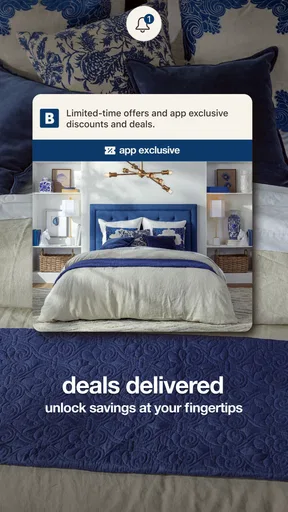
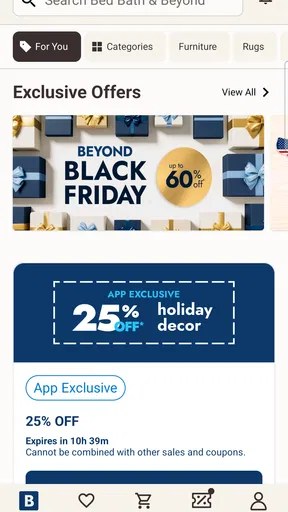
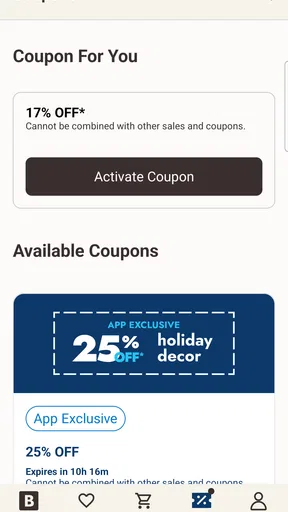
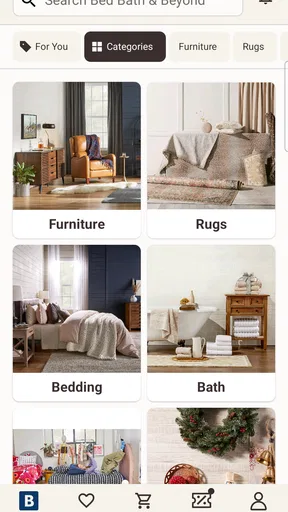
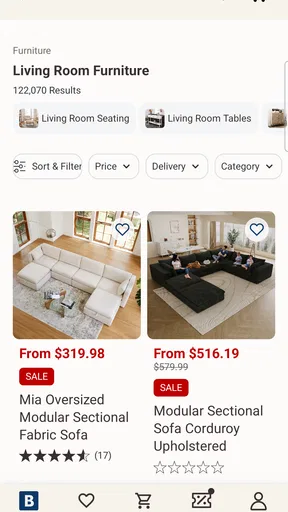
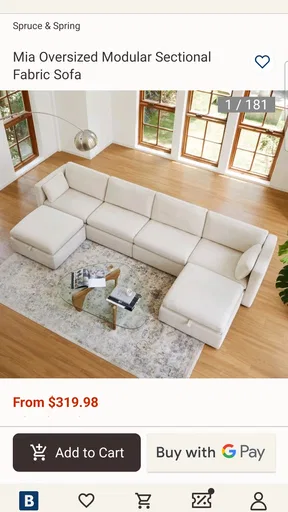
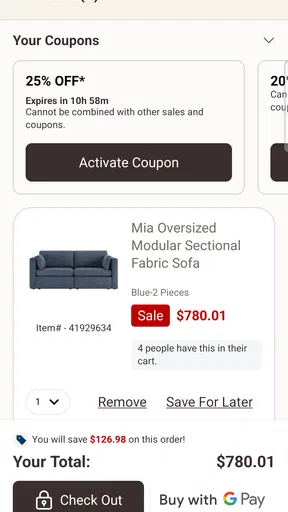
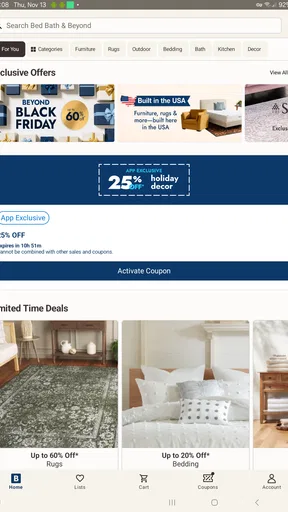
Our Review of Bed Bath & Beyond
 Analysis by Appyee
I found Bed Bath & Beyond most useful when I treated it as a shopping companion rather than a complete replacement for every way of buying home goods. The app is free to download and use, belongs to the Shopping category, and is developed by Neighborhood Intelligence, Inc. In everyday terms, it gives me a focused place to browse products for bedrooms, bathrooms, kitchens, storage, décor, and other parts of the home without mixing that search with unrelated shopping categories.
That focus matters more than it may sound. When I am looking for a shower curtain, new towels, bedding, or a small kitchen item, I usually want to compare several styles quickly and move on. A dedicated home-shopping app keeps that task narrower than a general marketplace. My overall impression is positive, but I would not call it essential for everyone. Its value depends on whether you regularly shop for household items and prefer doing that from a phone.
How the app fits into real home shopping
Bed Bath & Beyond is best understood as a mobile storefront for home-related shopping. I can open it with a specific need in mind, such as replacing worn sheets, or use it more casually when I am trying to improve a room. That distinction affects how satisfying the experience feels. A targeted search tends to make the app practical, while open-ended browsing can become a long session of comparing colors, patterns, materials, and prices.
The app has been available since February 16, 2010, so it is not a newcomer trying to prove that mobile shopping works. Its current version is 2026.8.0, and it supports operating systems from version 8.1 onward. That broad compatibility makes it approachable for people who do not use the newest phone, although the experience will still depend on the device, connection, and operating system in use.
Its store short description is simply “Bed Bath & Beyond,” while the longer summary presents it as a way to get more for every room, home, and budget. I find the broader idea accurate as a description of the shopping scope, but it should not be mistaken for a promise that every item will suit every budget or decorating style. The useful part is the concentration on home products, not a guarantee that the app will always be the cheapest place to buy them.
What I check first when opening it
I start with the exact room or product problem I want to solve. Searching for “bath towels,” “storage,” or “bedding” gives me a more useful starting point than scrolling without a plan. Once I have a shortlist, I slow down and inspect the product information rather than choosing the first attractive image. For home goods, the difference between a good purchase and an annoying one often comes down to size, fabric, care instructions, color, or how an item will work with what I already own.
One practical habit is to create a short comparison list before deciding. I look at two or three similar items and write down what actually separates them: construction, dimensions, appearance, and total purchase value. This prevents the common mistake of treating a lower displayed price as the best deal when another product may be more suitable for the room or easier to live with.
I also recommend using the app during the planning stage, not only at the moment of purchase. If I am refreshing a guest room, I can browse bedding and bath products first, then decide on a color direction before buying anything. That makes the app more useful than a quick impulse-shopping tool because it helps me form a coherent list rather than collecting disconnected items.
Free access and what that means for value
There is no purchase price for accessing the app itself: Bed Bath & Beyond is free. That makes the initial decision easy. I can install it, browse the catalog, and decide later whether any product deserves my money. The free entry is especially helpful when I am comparing home items with other retailers and do not want to commit simply to see what is available.
It is important to separate free app access from the cost of the products inside it. The app being free does not make bedding, furniture, décor, or household supplies free. The real financial value comes from whether the products, offers, and buying process fit my needs after I have checked the details. I judge it as a no-cost shopping tool first, then evaluate each purchase independently.
That distinction also changes how I compare it with a physical store. Visiting a shop lets me touch towels, judge colors under real lighting, and estimate scale by eye. The app is more convenient for browsing at home, but a screen cannot fully reproduce texture or physical size. For products where feel is central, I use mobile browsing to narrow the options and prefer an in-person check when that is practical.
Where the app delivers useful everyday value
The strongest value appears when a household need is specific but not urgent. Imagine I notice on a Saturday morning that the bathroom needs new towels before guests arrive later in the month. Instead of wandering through several unrelated shopping sections, I can use the app to explore towel styles, compare possible colors, and build a more deliberate shortlist. I can then make a decision without turning the entire day into a shopping trip.
Another useful scenario is moving into a new home. The list of needs can become overwhelming: sheets, bath items, organizers, kitchen basics, and small decorative pieces all compete for attention. I would use the app room by room, beginning with essentials and postponing decorative purchases. That workflow helps separate “I need this to function” from “I like the look of this,” which is a simple way to protect a limited household budget.
I also see value for people who dislike crowded stores or have limited time. Browsing from a sofa is not just a comfort feature; it allows me to compare options when I have the room measurements or existing colors in front of me. That context can lead to better decisions than trying to remember dimensions while standing in a shop aisle.
Three shopping habits that make it more useful
First, I keep a room measurement or a photo of the space nearby while browsing. This is particularly helpful for organizers, rugs, furniture, and décor, where an appealing product can be completely wrong once placed in the room. The app can show me an item, but my own measurements determine whether it is genuinely suitable.
Second, I use a two-pass method. On the first pass, I save or note products that appear promising without trying to decide immediately. On the second pass, I remove anything that does not match the room, the required size, or the intended use. This reduces impulse purchases and makes the app feel more like a planning tool than an endless product feed.
Third, I compare like with like. A decorative pillow, a set of towels, and a bedding item should not be judged by the same standard. I consider durability and care for textiles, capacity and access for storage, and proportion for décor. This sounds obvious, but shopping apps encourage fast visual decisions. Deliberately changing the question for each product category leads to better results.
Where it falls short compared with alternatives
The main trade-off is specialization. A general marketplace may offer more brands, more unusual products, or a wider range of prices in one search. A local store may let me inspect quality immediately. A price-comparison service may make it easier to check several retailers at once. Bed Bath & Beyond is more appealing when I want a home-focused shopping environment, but it is not automatically the best destination for every item.
For a highly specific replacement part, a general retailer may be faster. For a product where exact color matching matters, a physical shop may be safer. For a large purchase, I would also want to compare delivery terms, return conditions, and final costs across available sellers rather than relying on a single app simply because it is convenient.
There is also a mental cost to browsing. Home décor is visually persuasive, and it is easy to start with one practical need and end up considering several optional purchases. I would not open the app without a rough budget or a shopping list if I am trying to control spending. The free download removes an access barrier, but it does not remove the temptation to buy more than planned.
Who will get the most from it
I think the app is a good fit for renters, homeowners, students setting up a room, families replacing everyday household items, and anyone preparing a home refresh. It is particularly suitable for people who want to browse from a phone and prefer a store centered on rooms rather than a broad marketplace filled with unrelated products.
It can also help gift shoppers who know the recipient’s home style but do not know exactly what to buy. Browsing by room or need can produce better ideas than guessing from a generic gift category. I would still check practical details carefully, especially when the gift depends on size, color, or compatibility with the recipient’s existing items.
On the other hand, I would skip it as my only shopping option if I need the lowest possible price across the entire internet, want to inspect fabric before buying, or need a specialized product outside ordinary home shopping. In those cases, I would use it as one comparison point rather than the final authority.
What new users should decide before installing
The first question is whether mobile browsing genuinely improves the way you shop. If you already know the exact product and can buy it faster through a retailer you trust, installing another app may not add much. If you are furnishing, organizing, or refreshing several rooms, the focused catalog can save time by keeping the search relevant.
The second question is whether your phone can run it comfortably. The stated minimum operating system is 8.1, which covers older devices, but compatibility alone does not guarantee a smooth experience. Storage space, connection quality, and general device performance still affect how pleasant image-heavy shopping can be.
The third question is how you plan to use it. I get the best results when I treat it as a research and comparison tool before committing to a purchase. I check the product information, compare alternatives, consider the room, and only then decide whether the item deserves a place in my cart. That process is more reliable than opening the app for entertainment and buying whatever catches my eye first.
How established is it?
The app has an average rating of 4.5 from around 98 thousand ratings, with roughly 12 thousand written reviews, and it has passed 10 million installs. Those figures suggest that it has reached a substantial shopping audience and that many users find it worthwhile. I treat that as useful context rather than a substitute for my own priorities, because a high average cannot tell me whether the app suits my device, shopping habits, or expectations.
The Everyone content rating also makes it broadly accessible from an age-classification standpoint. That does not mean every purchase decision is simple, but it does make the app suitable for ordinary household shopping without the kind of age restriction associated with entertainment or mature content.
My final buy-or-skip verdict
I would recommend trying Bed Bath & Beyond if you regularly shop for home goods and want a free, focused way to browse from your phone. Its best use is deliberate planning: measure the space, identify the actual need, compare a small group of products, and keep optional décor separate from essentials. Used that way, it can make home shopping more organized and less dependent on wandering through a store.
I would skip making it my sole shopping destination if price comparison, physical inspection, or highly specialized products matter more than convenience. The app’s free access is a clear advantage, but the value of any purchase still depends on the individual item and the alternatives available. My honest conclusion is that it earns a place as a practical home-shopping option, especially for room-by-room projects, but it works best alongside sensible comparison rather than blind loyalty.
Verdict
Strengths of Bed Bath & Beyond
- Wide range of home, bath, kitchen, and bedding products
- Frequent coupons and promotional discounts can reduce prices
- Useful product categories make browsing relatively straightforward
- Offers recognizable household brands alongside store products
- Convenient option for comparing home essentials in one place
Limitations of Bed Bath & Beyond
- Some popular items may sell out quickly during major promotions
- Discount terms can vary and may exclude selected brands or products
- Product quality and value can differ noticeably between listings
- Large catalog may make finding specific items time-consuming
- Shipping costs and delivery times may depend on location and order size
Similar Picks in This Category
View All
SHEIN-Shopping Online
Roadget Business PTE. LTD.4.8

Amazon Shopping
Amazon Mobile LLC4.4


Mercado Libre: Compras online
Mercado Libre4.8

Wish: Shop and Save
Wish US Holdings LLC4.7

Alibaba.com - B2B marketplace
Alibaba Mobile4.4
Frequently Asked Questions
What is the Bed Bath & Beyond app used for?
The Bed Bath & Beyond app is designed for browsing and purchasing home goods, including bedding, bath essentials, kitchen products, furniture, décor, storage items, and seasonal merchandise. After installing it, users can explore product categories, check prices and availability, read customer reviews, save items, and place orders from a mobile device instead of using the retailer’s website.
Can I use the Bed Bath & Beyond app to find discounts and promotions?
Yes, the app commonly highlights sales, limited-time promotions, clearance products, and retailer offers throughout the shopping experience. Depending on the promotion, discounts may apply automatically or require a coupon code at checkout. Before relying on an advertised deal, review its terms, expiration date, eligible products, and any exclusions, since offers can change and may not apply to every item.
Does the Bed Bath & Beyond app support delivery and order tracking?
The app generally allows customers to choose from available delivery options during checkout and view the progress of orders after purchase. Tracking information may appear once the order has been processed and handed to the carrier. Delivery speed, shipping fees, and available services can vary according to the product, destination, inventory location, and whether an item is shipped directly by a marketplace seller.
Can I return products purchased through the Bed Bath & Beyond app?
Returns are usually subject to the retailer’s current return policy, which may depend on the product category, purchase date, condition, and seller. Some items can have special restrictions, including mattresses, furniture, personalized products, clearance merchandise, or opened goods. Before ordering, check the applicable return instructions in the app or on the retailer’s website so you understand deadlines, refund methods, and possible shipping costs.
Is the Bed Bath & Beyond app free to download and safe to use?
The official Bed Bath & Beyond app is generally free to download, although purchasing products, delivery, taxes, and other applicable charges are handled separately. For safer use, download it only from the official Google Play Store or Apple App Store, verify the publisher name, and keep the app updated. Review requested permissions and use secure account credentials when saving personal or payment information.
